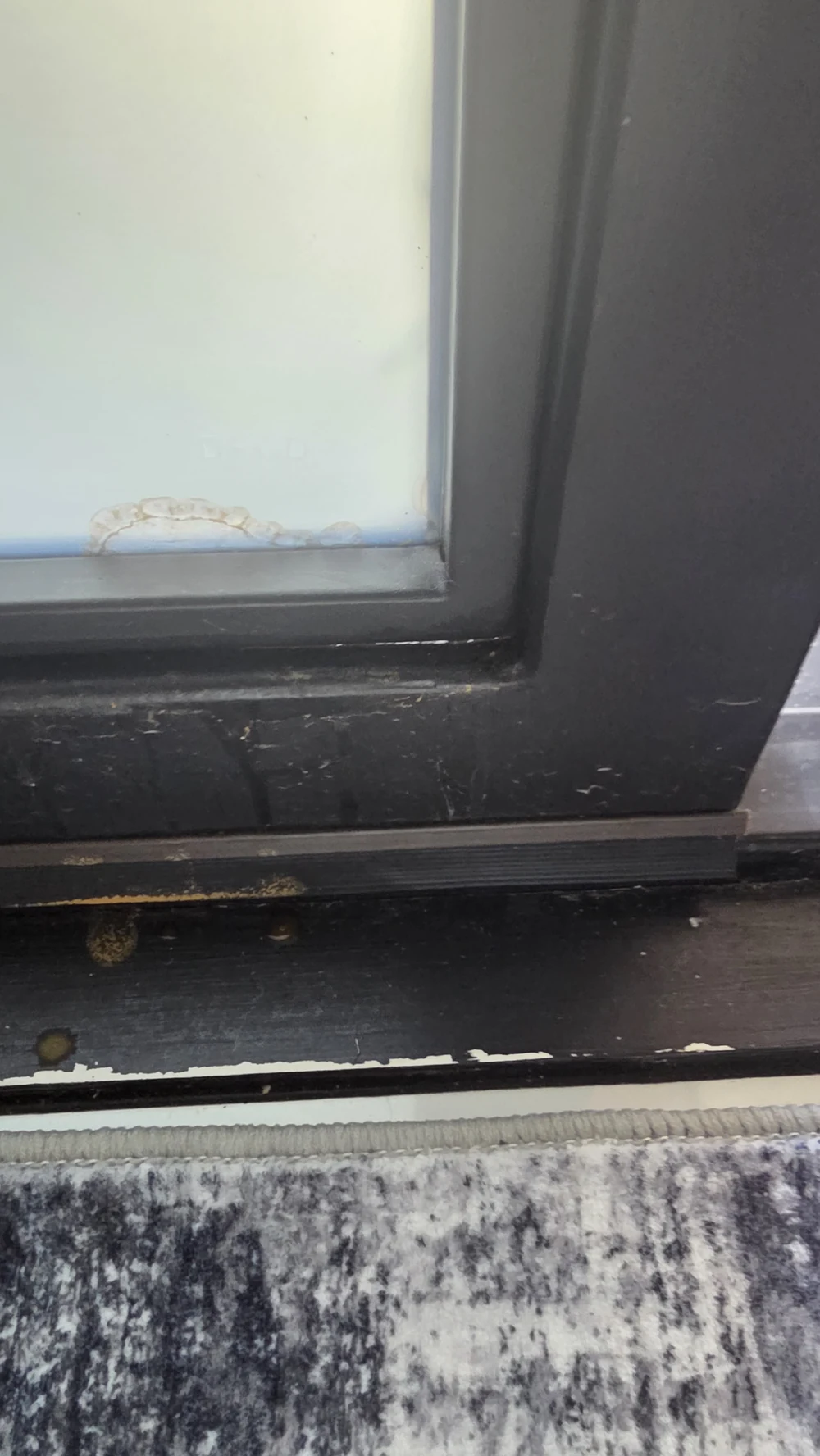
Real installation: edge marks and visible streaks
These original photographs show the condition documented during a service visit. The first shows the lower-edge mark in context. The second shows the door panel and visible streaks under the lighting at the visit. Surface residue, optical reflections, and a change within the film cannot be distinguished reliably from these images alone. Product identification, cleaning history, and an on-site assessment are needed before attributing a cause or deciding on repair.
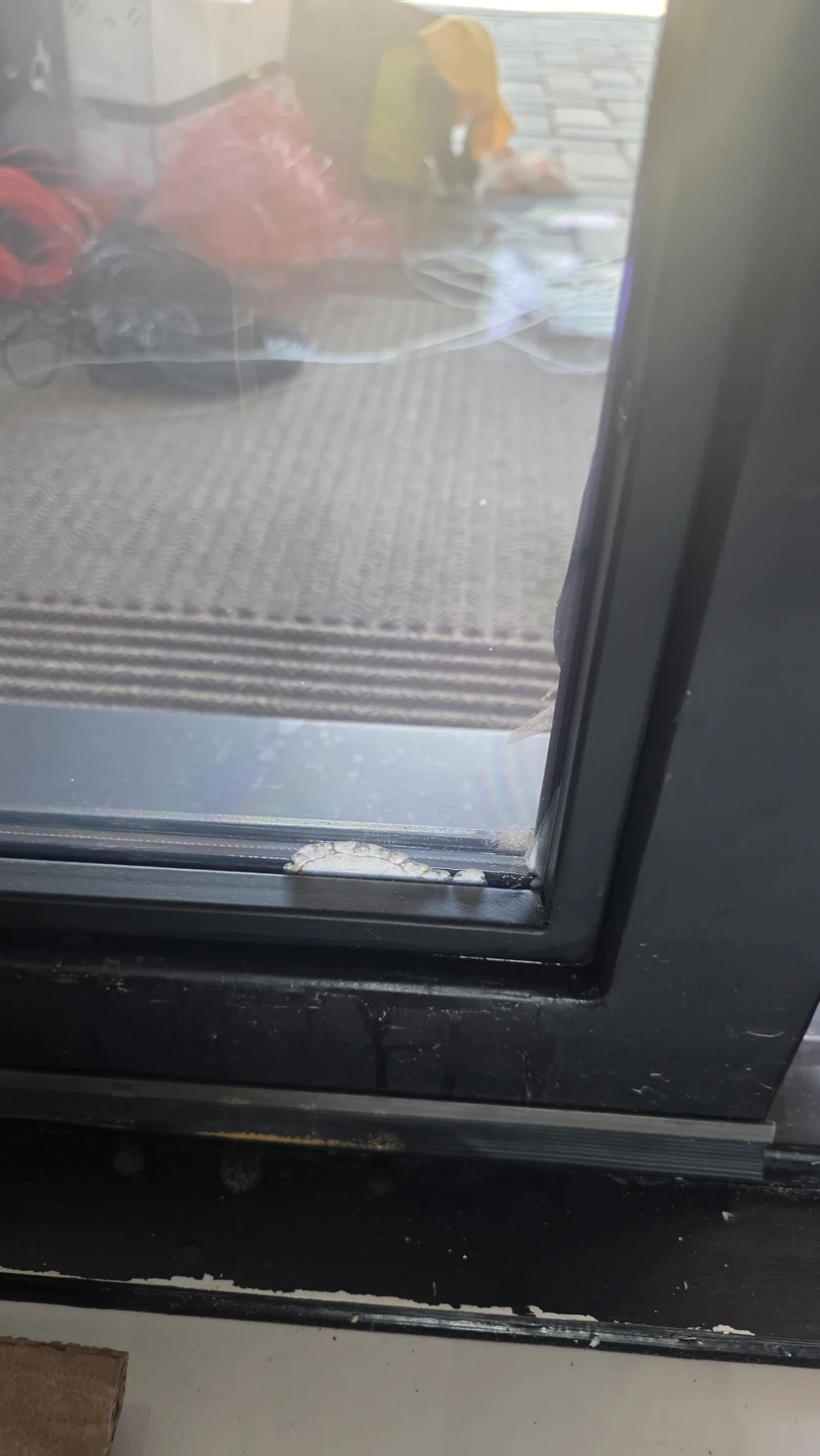
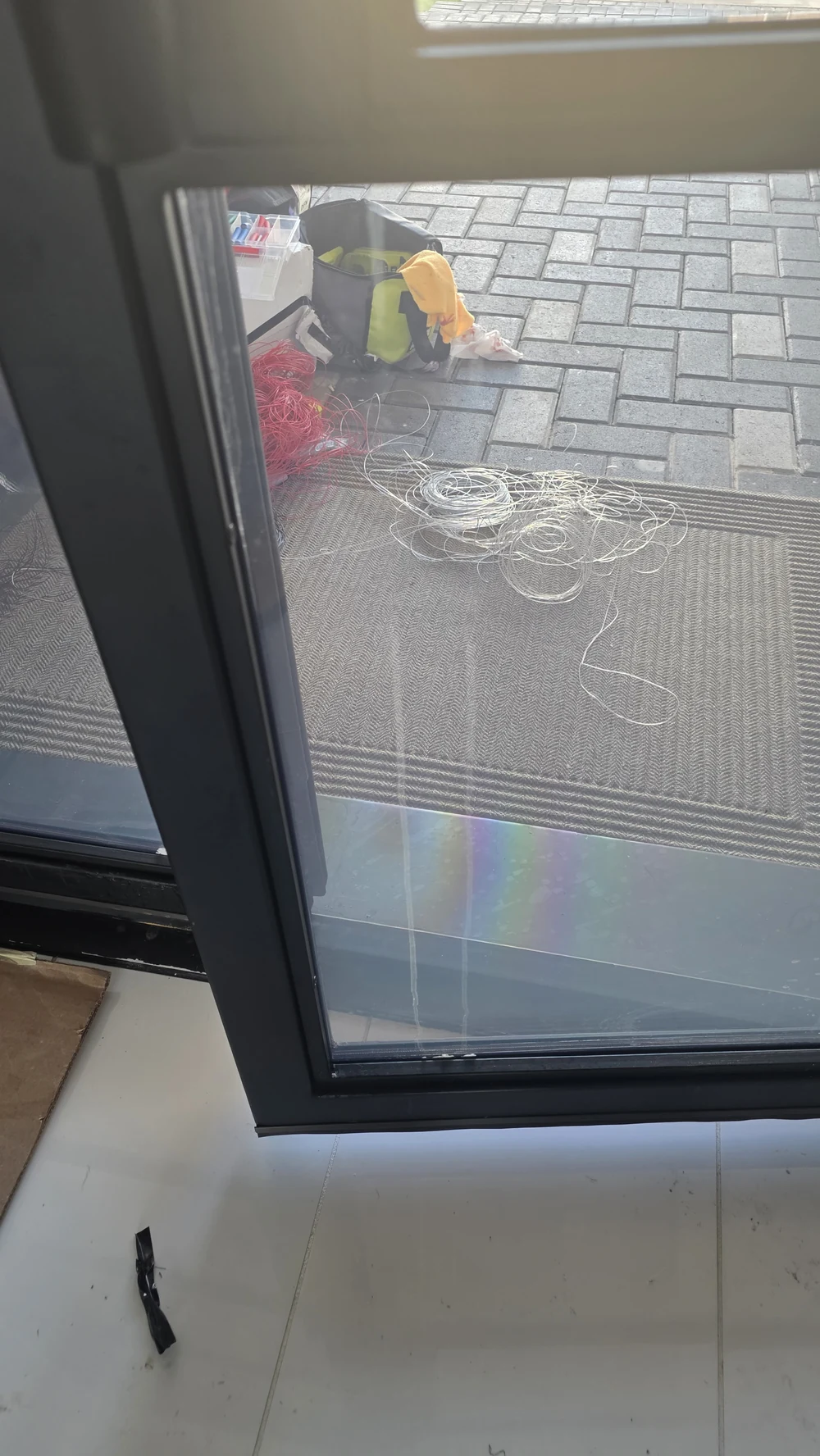
Images have been resized and the lead image cropped for display. The visible conditions have not been retouched or recreated.
What to do when smart film changes appearance or stops switching
A cloudy patch, a white edge, peeling, or a panel that will not switch deserves a closer look. None of these symptoms alone proves that water entered the assembly or that the panel needs replacement. A surface mark, an edge condition, the film itself, or the power and control system may need assessment.
Leave the installation intact. Record what changed, when you first noticed it, and how many panels are affected. Take an overview photo and a close-up without removing trim or touching connections. If the system is dry and appears safe to use, a short video of its response to the normal wall switch or remote can help. Do not operate it to make a video if liquid may have reached electrical parts.
If you notice unusual heat, a burning smell, sparking, or liquid at electrical components, stop using the system and contact a qualified professional. Do not open covers or handle wiring, transformers, frames, or sealants.
Smart film problems: what to observe before requesting help
Use these observations to describe the problem. They are not a diagnosis, and they do not require taking anything apart.
| Symptom | What to observe | Next step |
|---|---|---|
| Cloudy or white edges | Where the mark starts, whether it has grown, and whether it looks different under the same lighting or during normal switching. | Photograph the edge and the whole panel. Request an assessment before assuming moisture damage or replacement. |
| Peeling or lifting at an edge | The visible location and extent. Note recent cleaning, contact, or nearby work without lifting the film to inspect it. | Leave the edge alone and keep it dry. Do not press it back, cut it, or add adhesive or sealant. |
| Spots, streaks, or a new stain | Whether the mark is visible on the exposed surface, when it appeared, and what cleaning product was used. | Pause cleaning in the affected area. Share the product name and photos; do not scrub or experiment with solvents. |
| One panel is not switching | Which panel is affected and how adjacent panels respond during ordinary use, if safe. Note any control changes. | Request a system assessment. A single non-switching panel does not identify the failed component. |
| Several panels stop switching together | Whether they share a control and whether the change followed an outage or building work. | Have a qualified technician assess the power and control system. Do not open or test electrical components yourself. |
| Moisture, condensation, or a nearby leak | Visible moisture, its location, and when the leak or condensation was noticed. Observe from a safe position. | Stop wet cleaning. If electrical parts may be wet, stop using the system and obtain professional help. |
Can water damage switchable smart glass or smart film?
Water can damage an unsuitable or inadequately protected installation, particularly where it reaches exposed film edges or electrical connections. That possibility does not establish the cause of a particular mark. A technician needs to identify the product, exposure, edge condition, and system behavior.
For self-adhesive SmartVinyl, the exposed film surface and its edges need product-specific care. Laminated SmartGlass places the PDLC layer between two glass sheets, but the complete assembly still needs suitable edge details and protected electrical connections. Laminated construction alone does not make every installation suitable for direct water exposure.
Bathrooms, shower enclosures, persistent condensation, and leaks require a review of the complete glazing system. See our wet-area and switchable shower-glass planning guide for assembly considerations. It is planning guidance, not a repair procedure for an existing installation.

Damage examples from SmartGlass USA care documentation
These are separate examples from our product-care documentation. The document presents the first pair as water-related edge damage and the second pair as damage associated with abrasive cleaners or perimeter-sealing products. They explain why cleaning and edge protection matter; they do not diagnose the installation photographed above.
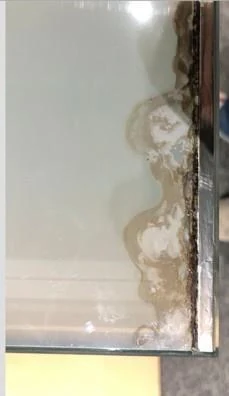
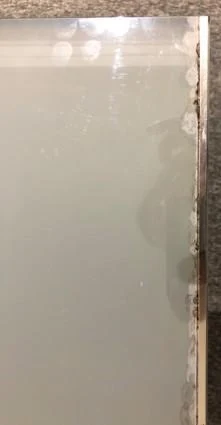
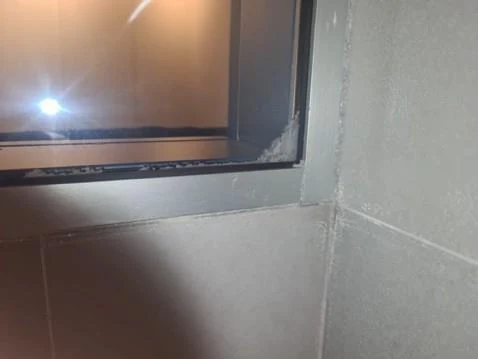
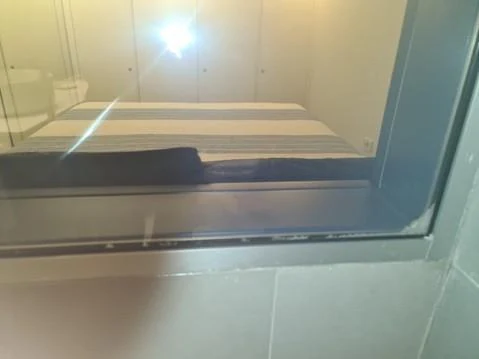
Extracted from the original care documentation at its available resolution.
How to clean PDLC smart film
For SmartVinyl, start with a dry, clean, lint-free microfiber cloth and a light touch on the exposed surface. Keep the cloth away from film edges and electrical connection areas. Do not spray the panel or soak the cloth. For a mark that dry dusting does not remove, check the approved spot-cleaning method for that exact product before continuing.
Our documented care instructions for the Dark Gray PDLC Smart Film system allow a small amount of isopropyl alcohol on the cloth for a spot only, used sparingly and away from film edges and electrical connections. Never spray or pour it onto the film. Confirm that this method is approved for your installed product before using it.
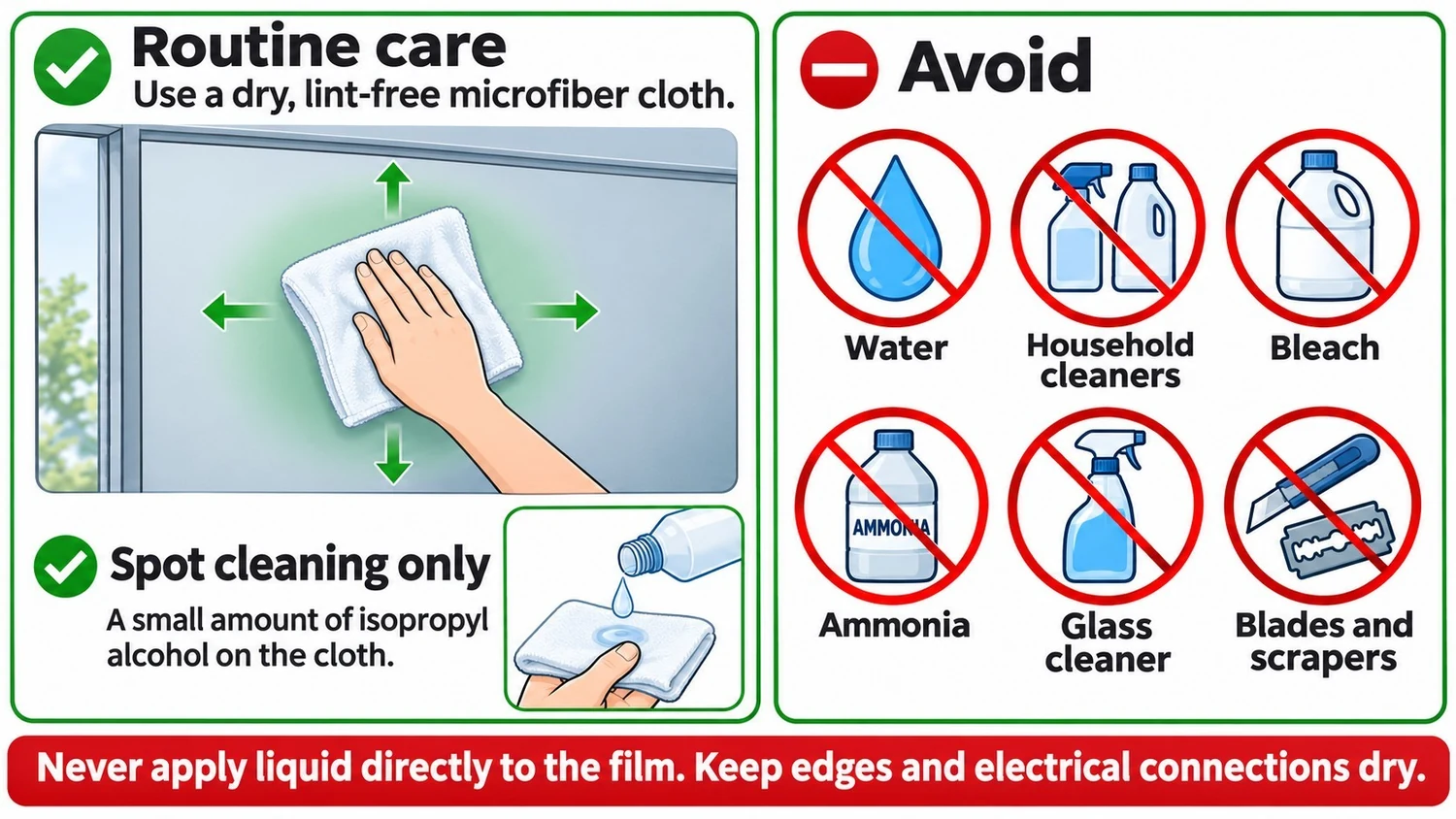
Cleaning directions can differ by product. A glass cleaner, alcohol-based cleaner, disinfectant, or method approved for one film is not automatically approved for another. If you do not know which product is installed, identify it before using a liquid cleaner. Follow the documented care instructions for laminated glass as well; keep its edges and connections dry.
Maintenance checklist for cleaning staff
- Identify the treated panels and keep their approved care instructions available.
- Use a dry, lint-free microfiber cloth for SmartVinyl dusting. Use light pressure.
- Do not spray, soak, or wet-wash the film. Keep edges and connections dry.
- Do not use abrasive pads, powders, scrapers, blades, or unapproved cleaning chemicals.
- Keep cleaning tools away from film edges and electrical areas. Do not adjust trim, wiring, or sealants.
- Report a new mark, lifted edge, or switching change. Pause cleaning in that area until instructions are confirmed.
PDLC smart film maintenance should preserve the installed system. Do not use heat, pressure, extra adhesive, or a new perimeter sealant as a home repair.
Why is my smart film not switching?
A non-switching panel can involve the control, power supply, connections, or the panel itself. Record whether one panel or a group changed, whether the change is intermittent, and whether an outage or recent work preceded it. These details help narrow the professional assessment; they do not confirm which component failed.
Electrical measurements and component checks belong to qualified technicians. Our PDLC power troubleshooting reference for qualified technicians explains that part of the system review. Owners and cleaning staff should not disconnect cables, open transformers, or take measurements.
Can moisture-damaged smart film be repaired?
The answer depends on what is actually damaged. A control or connection issue may call for a different scope than damage within the film or laminated assembly. If damage inside the PDLC layer is confirmed, replacement of the affected film or glass assembly may be necessary. A photograph cannot establish that scope or guarantee that a repair is possible.
Before accepting a repair or replacement proposal, ask what was found, which component is affected, and whether the source of exposure or the surrounding installation also needs attention. Replacing material without addressing the confirmed cause can leave the same problem unresolved.
Keep the original order, product identification, handover instructions, and service records. Warranty eligibility depends on the terms of that particular installation and the assessment findings. This guide does not determine coverage or extend a warranty to work supplied by another company.
What if my smart film installer is not responding?
You can request a second opinion from SmartGlass USA. Send a factual description of the change and keep any earlier service correspondence. An initial review can help establish what further information or assessment is needed. Work on another company's installation depends on product identification, location, access, and technical findings; repair availability, price, and warranty coverage are not assumed.
If you are choosing someone to assess an existing installation, our smart film installer checklist explains what to ask about product fit, responsibilities, and support.
Frequently asked questions
Is PDLC smart film waterproof?
Do not assume it is. Suitability depends on the specific product and complete installation. Keep self-adhesive SmartVinyl dry and use only its approved cleaning method. Wet-area use requires an assembly specifically suitable for that exposure.
Why is my smart film peeling at the edges?
Visible lifting does not identify the cause. Product adhesion, edge conditions, moisture, cleaning exposure, or physical contact may need review. Leave the edge intact, document the change, and request an assessment.
Do cloudy edges mean water has entered the film?
No. Cloudy edges are a visible symptom, not proof of water entry. Photos and the history of the installation help guide a review, but the cause may require inspection.
Can I use regular glass cleaner or rubbing alcohol?
Only use a cleaner expressly approved for the exact installed product. For SmartVinyl dusting, use a dry, lint-free microfiber cloth. Do not assume that glass cleaner or rubbing alcohol is suitable, and do not spray or soak the film.
Does a panel that will not switch need to be replaced?
Not necessarily. The power and control system, connections, and panel need to be assessed before deciding on replacement. Do not open or test electrical components yourself.
Can SmartGlass USA assess film installed by another company?
You can request a second opinion. Share your location, symptoms, timing, and affected panel count so SmartGlass USA can review the request. An assessment request does not establish repair availability, a price, or warranty coverage.
Request a review of the installation you already have
Not getting support from your original installer? Tell us what changed.
In the contact form, use the “What do you need?” field to include your city and state, the symptom, when it started, and how many panels are affected. Add the product or installer name if known. Save overview photos, close-ups, and a short video for follow-up by email.
Request an assessment of an existing installationSmartGlass USA will review the details to determine the next step. Repair, replacement, service availability, pricing, and warranty coverage depend on the installation and assessment.